Ping Basics: IdP, SP, adapters
http://www.pingidentity.com/tech-answers/integration/
Ping + Citrix Docs:
http://www.pingidentity.com/support-and-downloads/product-documentation/citrix-integration-kit/2-0/loader.cfm?csModule=security/getfile&pageid=5900
Ping + SharePoint
http://www.pingidentity.com/support-and-downloads/product-documentation/iis-integration-kit/2-2/loader.cfm?csModule=security/getfile&pageid=5917
Use Impersonation and Delegation
http://msdn.microsoft.com/en-us/library/ms998351.aspx
Delegation of authentication
In Windows, a server can be marked as “trusted for delegation.” This means a server can authenticate to services as if it were a user. The services cannot tell that the request is being made by a server rather than directly by a user.
There are two types of delegation:
Unconstrained delegation: If you select the Trust this computer for delegation to any service (Kerberos Only) check box, the server can access any other service as the user as long as the user authenticated to it using Kerberos.
Note: This setting does not work with ADFS deployments.
Constrained delegation: If you select the Trust this computer to specified services only check box, the server can access only certain services as the user.
http://support.citrix.com/article/ctx110784
The setup for Citrix for Ping must involve Kerberos and is similar to setup for SharePoint front endservers and sql server.
Kerberos Issues:
http://support.microsoft.com/kb/907272
Friday, March 26, 2010

Thursday, January 21, 2010
Page Viewer Web Part with 100% height for the IFrame
In nutshell, how to display a Page Viewer Web Part with 100% height of the available screen estate.
http://blogs.msdn.com/malag/archive/2008/09/15/story-of-a-mischievous-page-viewer-web-part.aspx
var a = MSO_ContentTable.getElementsByTagName("table");
MSO_ContentTable.setAttribute("height","100%");
for(i=0;i<a.length;i++)
{
a[i].setAttribute("height","100%");
}
var z = document.getElementsByTagName("div");
for(i=0;i<z.length;i++)
{
if(z[i].id.indexOf("WebPartWPQ",0) >=0 )
{
if(z[i].hasChildNodes())
{
if(z[i].firstChild.nodeName.toUpperCase() == "IFRAME")
{
z[i].firstChild.setAttribute("height","100%");
}
}
}
}</script>
Thursday, January 7, 2010
Cost of Maintaining an Employee: FICA and Unemployment taxes.
The Cost of maintaining an employee:
FICA:
The FICA on an Employee is: 7.65%
UnEmployment:
The Texas unemployment rate is 2.7% of the first $9000, this is the max per year.
The Federal unemployment amount is : $56/yr
FICA:
The FICA on an Employee is: 7.65%
UnEmployment:
The Texas unemployment rate is 2.7% of the first $9000, this is the max per year.
The Federal unemployment amount is : $56/yr
Monday, November 16, 2009
Field security/Column Security in SharePoint(MOSS/WSS) List
Field security/Column Security in SharePoint(MOSS/WSS) List:
Free from CodePlex:
http://www.codeplex.com/SPListDisplaySetting
http://securefields.codeplex.com/
http://sppex.codeplex.com/
The free ones will work for the most part but if you need more then go for the paid one here:
http://www.kwizcom.com/ProductPage.asp?ProductID=1048&ProductSubNodeID=1049
Free from CodePlex:
http://www.codeplex.com/SPListDisplaySetting
http://securefields.codeplex.com/
http://sppex.codeplex.com/
The free ones will work for the most part but if you need more then go for the paid one here:
http://www.kwizcom.com/ProductPage.asp?ProductID=1048&ProductSubNodeID=1049
Tuesday, November 10, 2009
Improve SharePoint Server (MOSS) Performace
Thanks to Roger Lamb please find references to improve SharePoint’s performance:
Case Study: Using Microsoft® Office SharePoint® Server to implement a large-scale content storage scenario with rapid search availability (TechNet)
White paper: Database Maintenance for Microsoft® SharePoint® Products and Technologies (TechNet)
White paper: Scaling SharePoint 2007 - Storage Architecture (Knowledgelake)
Physical storage recommendations (Office SharePoint Server) (TechNet)
How to defragment Windows SharePoint Services 3.0 databases and SharePoint Server 2007 databases (KB)
White paper: Planning and Monitoring SQL Server Storage for Office SharePoint Server: Performance Recommendations and Best Practices (TechNet)
Configuring Caching, IIS Compression, and Other Performance Options for SharePoint (Video)
Case Study: Using Microsoft® Office SharePoint® Server to implement a large-scale content storage scenario with rapid search availability (TechNet)
White paper: Database Maintenance for Microsoft® SharePoint® Products and Technologies (TechNet)
White paper: Scaling SharePoint 2007 - Storage Architecture (Knowledgelake)
Physical storage recommendations (Office SharePoint Server) (TechNet)
How to defragment Windows SharePoint Services 3.0 databases and SharePoint Server 2007 databases (KB)
White paper: Planning and Monitoring SQL Server Storage for Office SharePoint Server: Performance Recommendations and Best Practices (TechNet)
Configuring Caching, IIS Compression, and Other Performance Options for SharePoint (Video)
Monday, November 9, 2009
Block Certain Web Sites using Your Linksys WRT54G Series Router
Find the screen shots:
The point is to create a policy name and enter the list of PC's that the policy is going to be applied for, in my case I just gave a range of PCS 192.168.1.0 ~ 254.
If you want to be specific give the Mac Address.
In the "Website Blocking by URL Address" specify the website, skip the "http://" from the front of the URL name or the router will not block access to the website.
You can also block it by "Website Blocking by Keyword" the same way.
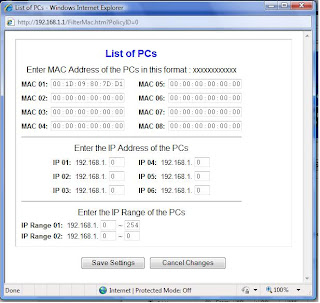
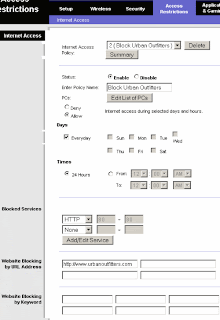
The point is to create a policy name and enter the list of PC's that the policy is going to be applied for, in my case I just gave a range of PCS 192.168.1.0 ~ 254.
If you want to be specific give the Mac Address.
In the "Website Blocking by URL Address" specify the website, skip the "http://" from the front of the URL name or the router will not block access to the website.
You can also block it by "Website Blocking by Keyword" the same way.


Wednesday, November 4, 2009
List Item level Security in sharepoint
Set Item Security based on Content Type that it is created from, and the based on the security groups (naming convention is used to tie them up)
http://mindsharpblogs.com/pauls/archive/2007/05/07/1754.aspx
----------------------------------------------------------------------------
http://www.endusersharepoint.com/2008/12/23/security-trimming-a-list-view/
Here’s a question that comes up quite a bit. This time, it was on Stump the Panel:
Does anyone know how I can use one SharePoint List but have different site users only access specific views (kinda like security trimming views) The scenario is I am working with some lawyers who should only access data on the list they are responsible for and shouldn’t see the data the other lawyers are responsible for. I want to only maintain one list so that its easy for me to update just the one list.
Response from Paul Grenier, Moderator of Stump the Panel:
Perfect reason to use folders. Folders can have their own permissions. You can break inheritance and give every object in them the same permissions. This allows you to group things in a list or library by permission. Works great for things like a library of personal expense reports.
"you can set views to not show folders"
---------------------------------------------------------------------------
http://www.siolon.com/blog/the-folder-less-sharepoint-paradigm/
Post opposing folders and using views instead. But provides no idea on how to implement item level security.
----------------------------------------------------------------------------
http://www.infoq.com/articles/Dressel-Gogolowicz-wss-security
Column Level Security in SharePoint, by defining a custom field type(inheriting from SPFieldLookup) and using that as a lookup column from another list.
----------------------------------------------------------------------------
http://mindsharpblogs.com/pauls/archive/2007/05/07/1754.aspx
----------------------------------------------------------------------------
http://www.endusersharepoint.com/2008/12/23/security-trimming-a-list-view/
Here’s a question that comes up quite a bit. This time, it was on Stump the Panel:
Does anyone know how I can use one SharePoint List but have different site users only access specific views (kinda like security trimming views) The scenario is I am working with some lawyers who should only access data on the list they are responsible for and shouldn’t see the data the other lawyers are responsible for. I want to only maintain one list so that its easy for me to update just the one list.
Response from Paul Grenier, Moderator of Stump the Panel:
Perfect reason to use folders. Folders can have their own permissions. You can break inheritance and give every object in them the same permissions. This allows you to group things in a list or library by permission. Works great for things like a library of personal expense reports.
"you can set views to not show folders"
---------------------------------------------------------------------------
http://www.siolon.com/blog/the-folder-less-sharepoint-paradigm/
Post opposing folders and using views instead. But provides no idea on how to implement item level security.
----------------------------------------------------------------------------
http://www.infoq.com/articles/Dressel-Gogolowicz-wss-security
Column Level Security in SharePoint, by defining a custom field type(inheriting from SPFieldLookup) and using that as a lookup column from another list.
----------------------------------------------------------------------------
Subscribe to:
Posts (Atom)